Plugin Translator by Brickfield
We are delighted to announce the launch of Plugin Translator by Brickfield, our cool new Moodle plugin.
This translates Moodle plugin language strings, which make up the interface display for users. It does not translate content, as this can be done in multiple other plugins and applications.

How does it work?
Our simple-to-use interface allows Moodle Administrators or Plugin developers to:
- Select a configured Translation API (Azure or DeepL), a plugin (or multiple plugins), and a language to submit for translation.
- When the results are returned from the Translation API, they appear side-by-side with the original English strings for comparison and are editable for any further required modifications.
- These reviewed language strings can then either be saved into the Moodle custom language files or downloaded as a complete PHP file for the language in question, ready for GitHub or any other plugin coding UIs.
- Saving the strings allows them to be managed and exported via the standard language customisation system.
- Either core or non-core plugins can be processed, switchable via a global setting.
- It can be used to review just missing language strings on their own, or can show both missing and existing language strings for reviewing and ensuring consistency for naming conventions.

This will save time for many organisations and plugin developers for tasks such as:
- Developing and managing multiple translations across a range of Moodle plugins.
- Site administrators needing some additional translations for their active plugins.
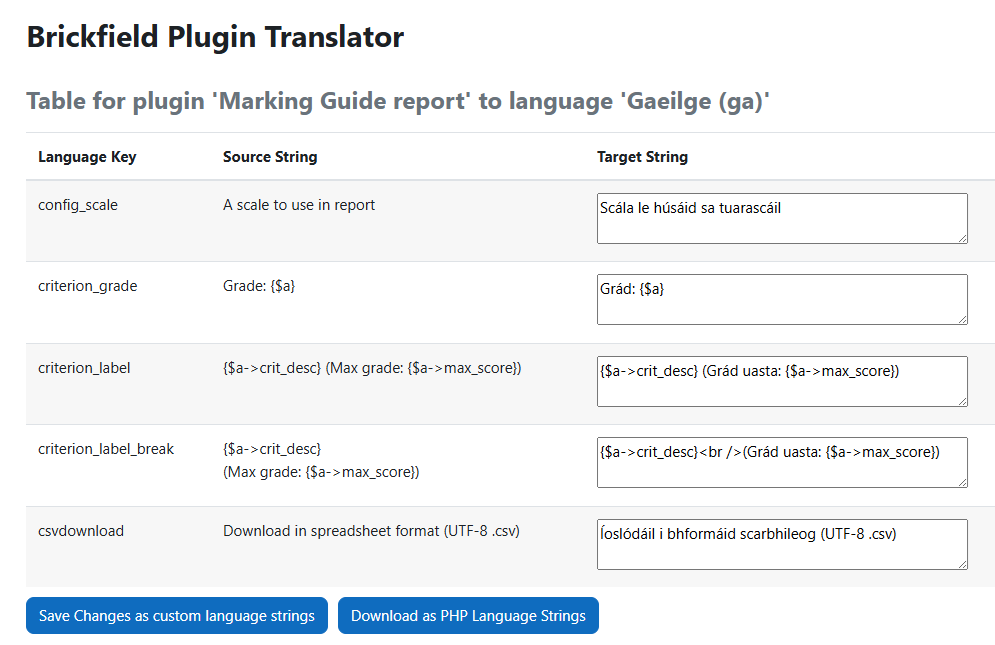
Plugin Translator by Brickfield can even be configured to process core plugins, to help review and update any gaps in a specific language pack.
What if I also want to review existing strings?
What if my selected plugin already has a number of its strings previously translated, and I want to be able to view them at the same time, to ensure both consistency and the following of naming conventions or vocabulary?
- Use the “Show existing” option on the form.
- The results page will now display BOTH existing strings and returned translations for the missing strings.
- An extra column will appear on the right, with “Existing” or “New” status text.
- These existing strings can now also be edited just like the translated ones, and then subsequently either be saved or downloaded.
Technical points
We have just a few points on the technical front:
- You will need to register for a DeepL or Azure Translator API account and pay for the usage.
- We provide links to the support documentation for our integrated Translation APIs:
- String placeholders are fully handled.
- HTML code within the strings is also fully handled.
- The Language String Manager is fully used; hence any customisations to the default English strings being translated from are included.
- Both missing strings and existing strings are reviewable.
- Our Roadmap includes processing sub plugins as part of their parent plugin, but currently they are listed and processed separately.
- Viewing any changes to an English language string from one release to another is outside the scope of this Plugin Translator. We recommend that you use Github or other code versioning system to pinpoint those changes on whichever plugin repository they are located. Then, using the “Show existing” option, have the latest English string displayed and review how to update the existing translated string to match.
We invite you all to try out Plugin Translator by Brickfield and we look forward to hearing what you think of it!
How to access Plugin Translator by Brickfield?
The source code and documentation on how to set up and use are in the public domain.

GitHub
The source code for Plugin Translator by Brickfield is available on our public GitHub repository.

Documentation
Our Documentation site – Brickfield Docs has a step by step user guide for the Plugin Translator by Brickfield, including configuration steps.
Plugins Directory
Plugin Translator by Brickfield is available here in the Moodle Plugins Directory for easy installation or download.
API Requirements
You will need to register for a DeepL API or Azure Translator API account and pay for the usage. This plugin simplifies the process of plugin string translation by integrating AI Services into your Moodle site.