Board - Moodle Activity Plugin
What is Moodle Board?
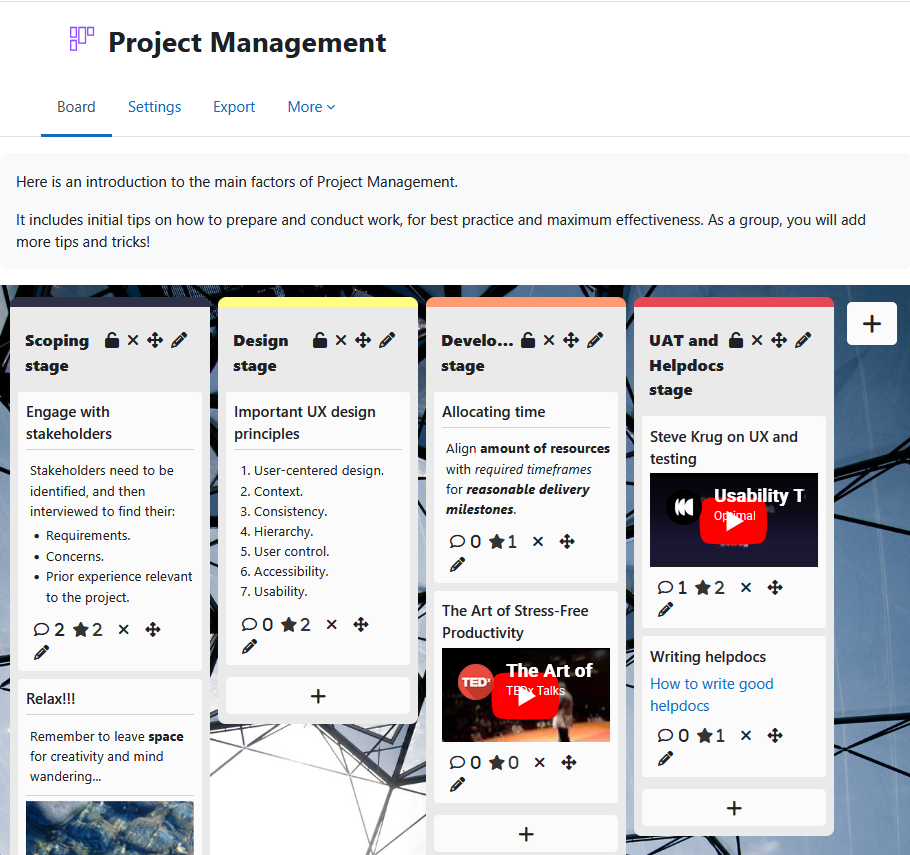
Board is a collaborative post-it board activity for Moodle courses. Teachers define the columns; students contribute posts containing text, links, images, files, or videos. Posts are anonymous by default — students see everything on the board but not who wrote what.
Board supports whole-class collaboration, separated group workspaces, and individual student boards. It is free, open source, and maintained by Brickfield Education Labs.
What students can do
- Add posts with text, links, images, files, or embedded YouTube videos.
- Edit, move, and delete their own posts.
- Like (star) posts, if enabled by the teacher.
- Comment on any visible post.
- Receive a Moodle notification when someone comments on their post.
What teachers can do
- Create and name columns, set colours, and lock columns to prevent further posting.
- Set a closing date for student submissions.
- Control whether students can rate, sort, or move posts.
- Enable group mode for separated group collaboration spaces.
- Enable single-user mode to give each student their own board — private or visible to peers.
- Use board templates, with pre-loaded descriptions and column structures, for easy deployment and reuse.
- Embed the board directly on the course page.
- Export board contents, submissions, and comments as CSV, Excel, HTML, or plain text.
How it gets used
Board works well for brainstorming, structured reflection, resource sharing, and peer discussion. In group mode it becomes a private collaboration space — useful for breakout activities in synchronous sessions, with the advantage that content persists after the session ends.
Single-user mode suits formative assessment and individual reflection tasks where students need their own workspace rather than a shared one.
What’s new
- Comment notifications — post authors now receive a Moodle notification when someone comments on their post.
- Board activities correctly display in the Activities overview.
Contact Us
Fill in the following form and one of our team will be in touch with you shortly.
Funding
Initial funding was provided by the National Institute for Digital Learning at Dublin City University under the SATLE fund from the National Forum. Subsequent funding has been received from Athlone Institute of Technology under the SATLE fund from the National Forum, and from UCL.
Funding for templates, text formatting, and file attachments was provided by the National Institute for Digital Learning at Dublin City University under the SATLE fund from the National Forum.
Funding for comment improvements, including notifications, icon, and icon count was provided by Charité – Universitätsmedizin Berlin.
Version support
Board supports Moodle 4.5 and later.